
Introduction
Software testing is simply checking that an application works properly for real people: correctly, safely and without frustration. It could be a shopping site, a login page or a PDF tool. Either way, the goal is the same: find the problems before your customers do.
If you’re new to testing, it can look like clicking around and seeing what happens. It’s considerably more structured than that. Once you understand a few core ideas and follow a clear process, it becomes far more manageable.
In this post, we’ll walk through how to understand a feature, write test cases, test past the expected behaviour, record what really happens and report bugs so others can act on them.
TL;DR summary
Start by understanding the feature, then set up a test sheet and write positive test cases using valid data. After that, write negative cases for wrong, empty and boundary inputs. Run every case, write down the actual result exactly as you saw it, mark PASS or FAIL honestly, and report each bug with clear steps. Practise on real websites and you’ll soon be spotting the problems users would otherwise have found for you.
What Is Testing Beyond Expectations?
It means checking a product with more than the valid data it was built for. You also try wrong input, empty input, extreme values and things nobody planned for. The aim is to confirm that the product works when everything goes right, and that it fails safely and clearly when things go wrong.
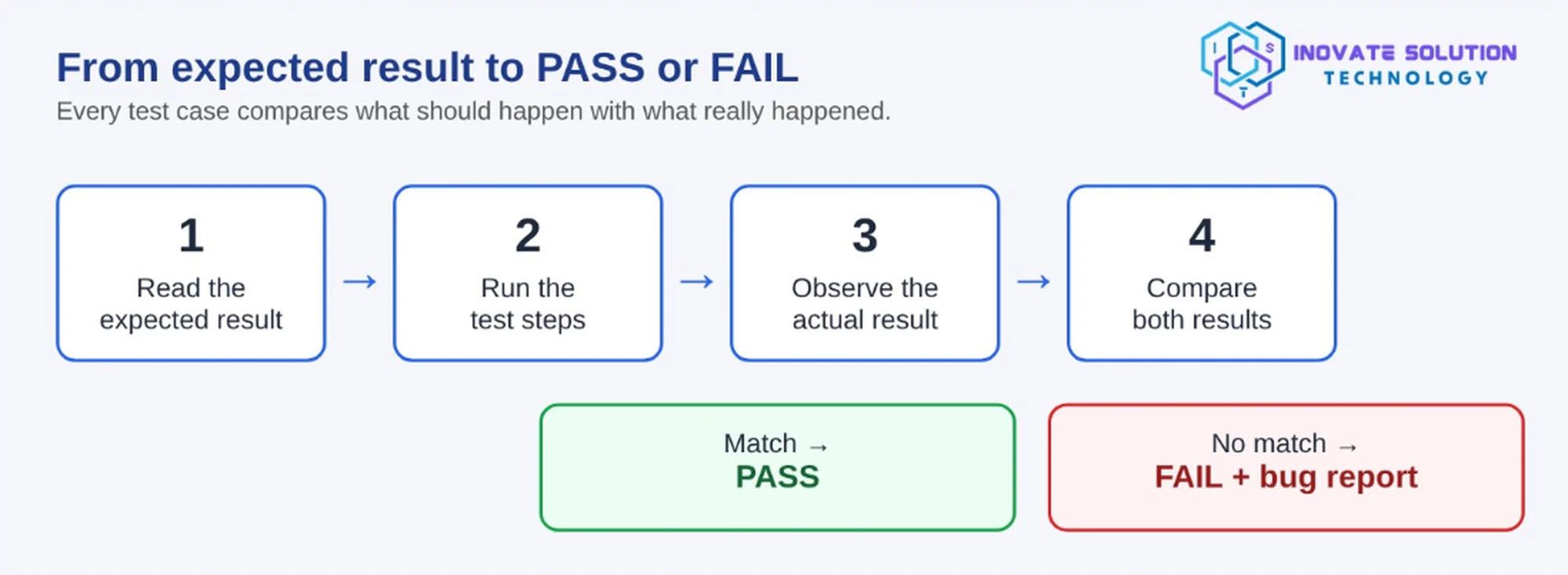
The idea at the centre of all this is simple: every test case compares an expected result with an actual result. Your job as a tester is to watch what really happens and report any difference honestly.
Key ideas
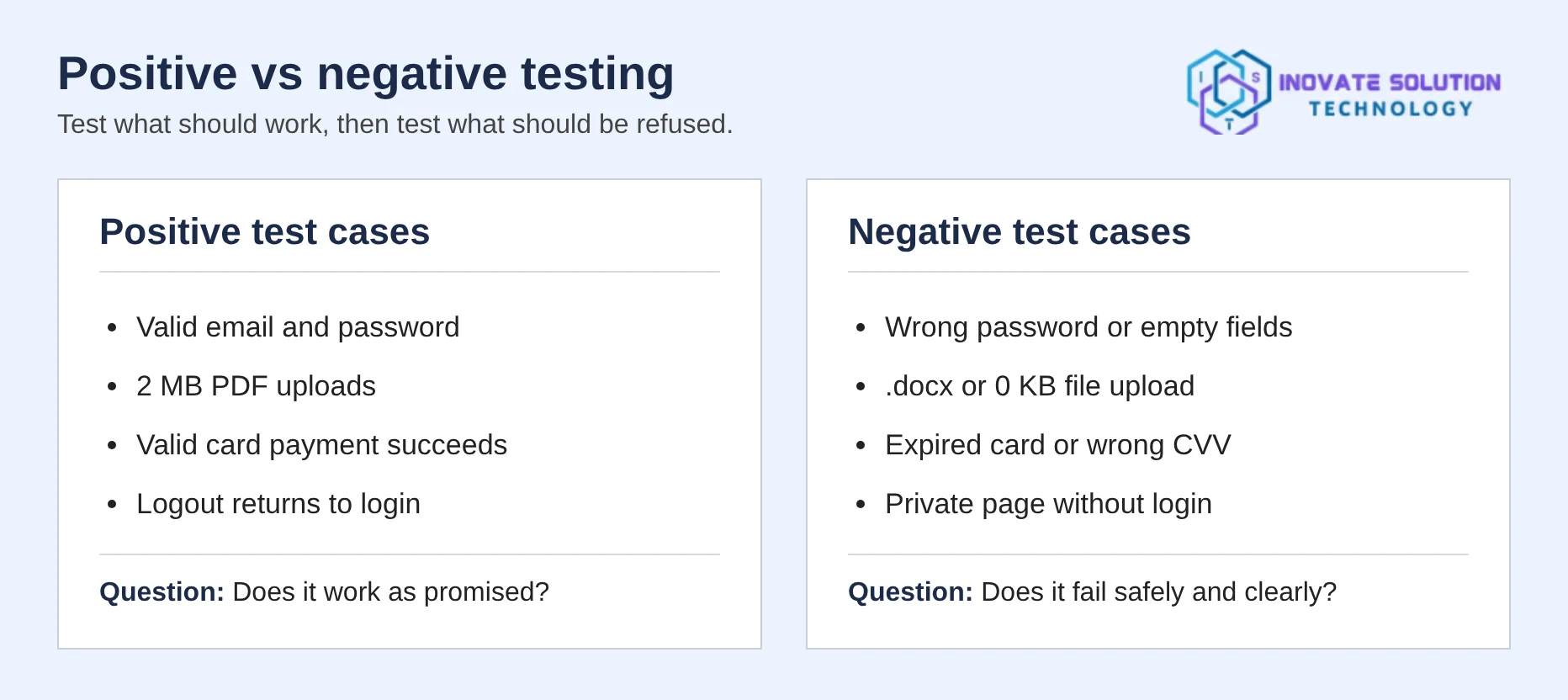
Positive testing uses valid input to confirm the feature does what it promises. Negative testing uses invalid input to confirm the product rejects it safely and with a clear message. Boundary testing checks values just under, exactly at and just over a limit. Empty input testing means submitting forms and fields with nothing entered. Honest reporting means marking PASS only when the behaviour matches the expected result, and FAIL only when it doesn’t.
What Do You Need Before Starting?
Before you write your first test case, it helps to be comfortable with a few basics. You should understand how websites work, including pages, forms, buttons, links and logins. You should know common testing terms such as test case, test data, expected result and actual result. You also need clear written English, because other people will read your test cases and bug reports.
You’ll also need a few tools. Use a web browser, ideally Chrome, with its developer tools. Use a spreadsheet, such as Excel or Google Sheets, to write your cases and record results. Keep a screenshot tool handy to capture evidence of bugs. For upload testing, keep sample test files such as a small PDF, an oversized file and a damaged file.
Step 1: Understand the Feature and What’s Expected of It
Open the website and explore the feature you’re about to test. Ask yourself what it’s supposed to do, who will use it and which rules apply, such as size limits or required fields.
Take a PDF upload feature that says files must be under 5 MB. That one sentence already gives you several test cases.
Step 2: Set Up Your Test Sheet
A test sheet is your single source of truth. It tells you what you planned to check, what you actually found, and what still needs to be done. Without it, testing turns into random clicking, and nobody else can repeat or review your work.
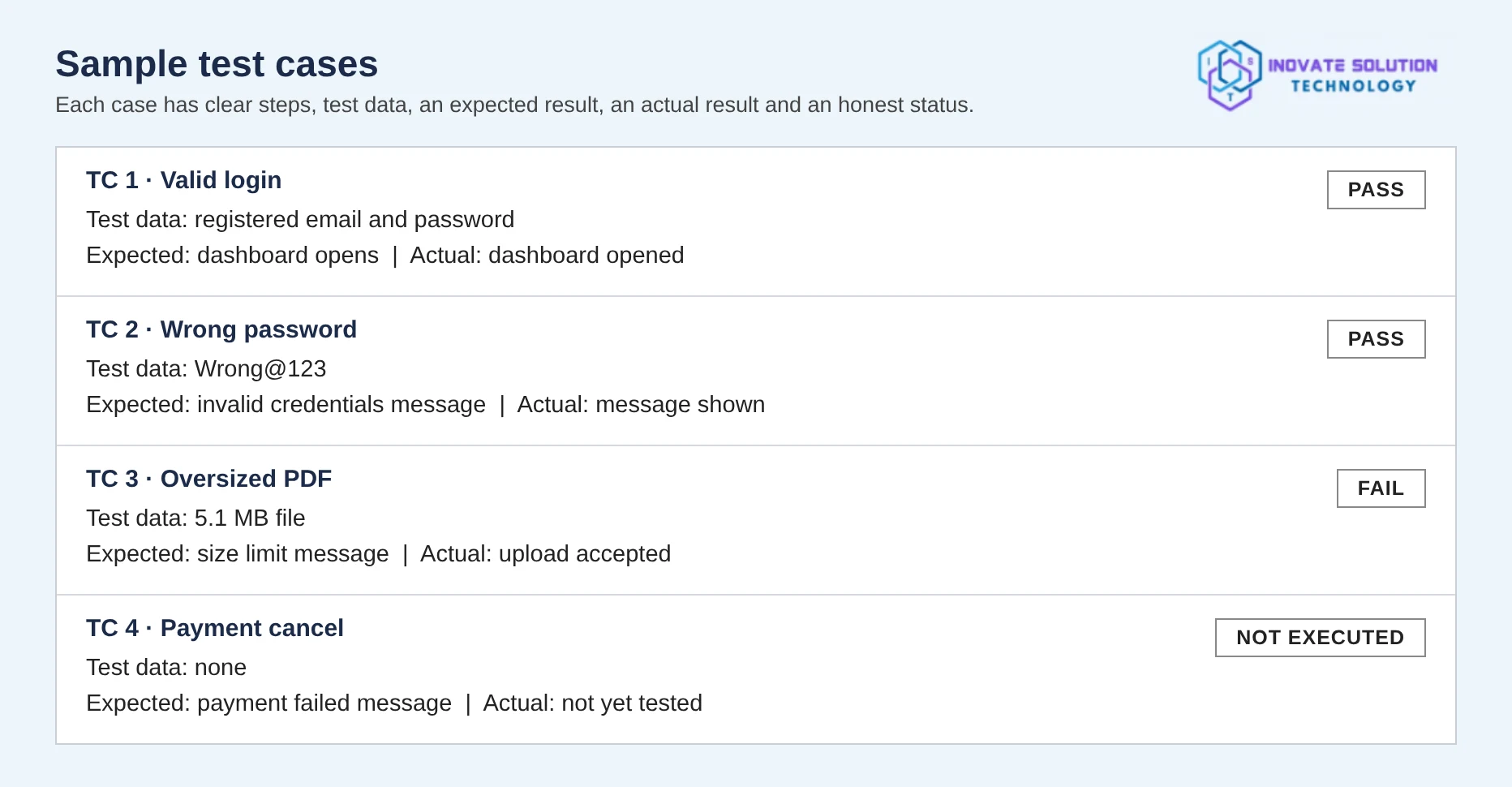
Create one tab per module and separate your positive and negative cases. Every case needs an ID, a title, clear steps, the test data used, an expected result, and space for the actual result and status. Keep the last two blank until you run the case.
A good sheet lets a colleague pick it up tomorrow and run every test exactly as you would.
As your project grows, you can add more columns, such as Priority (how important the case is), Module (the area of the site it belongs to), Tester name and Date executed. They aren’t required, but they make larger test sheets much easier to manage.
Step 3: Write Positive Test Cases
Start with the happy path. Write cases that use valid data and confirm the main feature works.
A real-life example: say you’re testing a website that turns PDFs into flipbooks. Your happy-path cases are simple. Sign in with a valid account, upload a 2 MB PDF, check that it shows up in the library, then sign out. If all three work, the main journey is healthy and you have a solid base to test beyond.
Pro tip: write one positive case for every promise the feature makes. If the page says “upload a PDF up to 5 MB”, you need a positive case proving that a normal PDF uploads successfully. Write each expected result as a clear sentence that someone else could check.
Step 4: Write Negative Test Cases
Now go beyond the expected. For every feature, ask what happens with wrong input, and write a case for each answer. These “what if” questions are a good starting point. What if the password is wrong, or the email has no @ symbol? What if the user uploads a Word file instead of a PDF? What if someone opens a private page without logging in? What if the connection drops halfway through an upload? What if the user clicks the pay button twice?
Each honest answer becomes a negative test case with its own expected result.
Step 5: Test Empty and Boundary Inputs
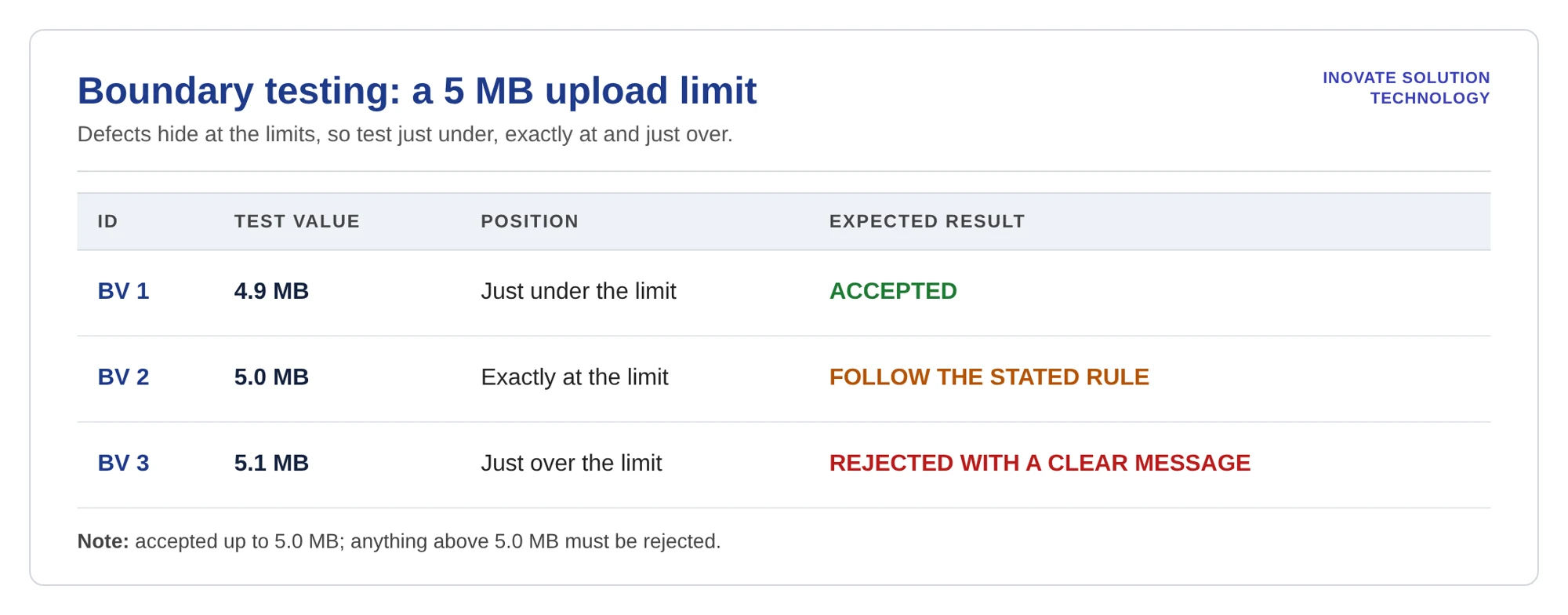
Submit every form with nothing entered, then test the limits. If a file limit is 5 MB, try three sizes. First, test just under the limit, such as 4.9 MB, which should be accepted. Second, test exactly at the limit, which should follow the stated rule. Third, test just over the limit, such as 5.1 MB, which should be rejected with a clear message.
Step 6: Run Every Case and Record the Actual Result
Open the website and follow each test case exactly as written. Then write down what really happened in the Actual result column, using a full sentence. Mark PASS only when the actual result matches the expected result, and mark FAIL only when it doesn’t. If you couldn’t test a case, leave it as not executed rather than guessing.
For example: “The corrupted PDF was rejected and the message ‘Use a readable, unencrypted PDF with 1–500 pages (maximum 5 MB)’ was shown.” That’s specific, honest and easy for others to verify.
Step 7: Report Bugs Clearly
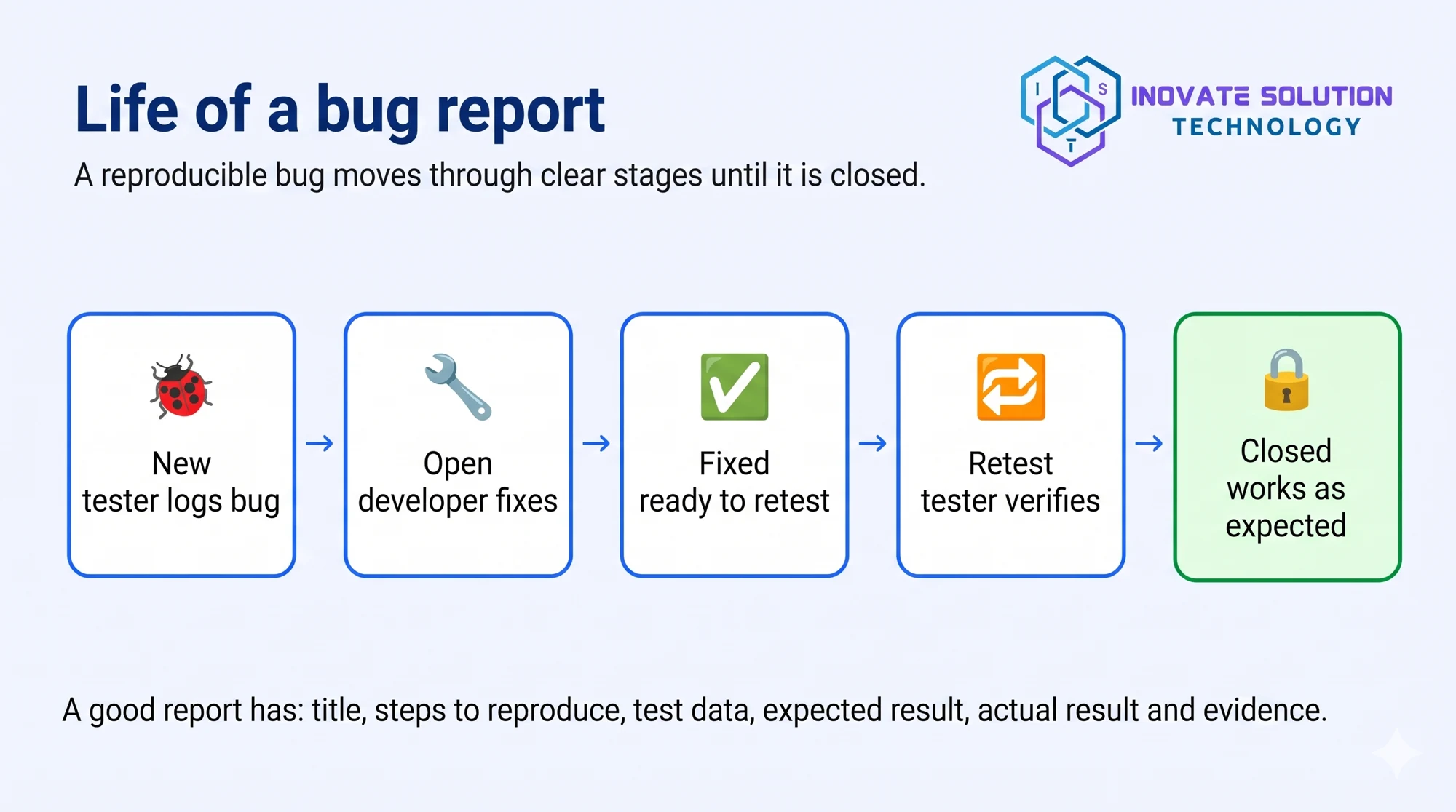
Sample bug report (BUG-001): Entering an invalid page address displays a blank screen instead of a 404 error page.
To reproduce the issue, open the browser and enter the site address followed by /wrongpage123. The expected behaviour is a clear 404 page with a link back to the home page. However, the application displays a blank screen. The severity is rated as medium, and a screenshot is attached as evidence.
Step 8: Review and Improve Your Testing
When all your cases have been executed, take a step back and review the results. Pass % is Passed ÷ Executed × 100, Fail % is Failed ÷ Executed × 100, and Completion % is Executed ÷ Total test cases × 100.
Also check that every FAIL has a bug ID and every bug has steps to reproduce. Then add new test cases for the areas where bugs turned up. Trying fresh inputs after each round will help you catch things your first test sheet missed.
Common Mistakes Beginners Should Avoid
Everyone makes a few mistakes when they start out. Knowing them in advance will make your testing a lot more reliable.
Testing only the happy path
If every case uses valid data, you’ll miss the bugs users hit first. Always add negative, empty and boundary cases.
Copying the expected result into the actual result
The actual result has to come from what you observed. Never fill it in before you’ve run the test
Marking untested cases as PASS
If you didn’t run a case, leave it as not executed. A wrong PASS does more harm than a missing result
Writing vague bug reports
A line like “login not working” wastes everyone’s time. Include the steps, the test data, and both the expected and actual results.
Ignoring small issues
A slow icon or a cramped button might seem trivial, but noting it down gives a truer picture of what users experience
Why Learn Software Testing?
Testing is a core part of building reliable software, and every team needs people who can think like a user while reporting like an engineer.
Learning it can help you understand how real applications behave, write clear test cases and bug reports, and build habits of careful observation and honest reporting. It can also prepare you for QA and software testing roles, and help you move into automation and other quality roles later on.
Quick Quiz: Test Your Knowledge
Let’s see how much you’ve learned about testing beyond expectations.
Q1. What is the main goal of negative testing?
A. Confirming the feature works with valid data
B. Confirming the product rejects invalid input safely and clearly
C. Making the application run faster
D. Skipping error messages
Q2. A file upload limit is 5 MB. Which file size is a “just over the limit” boundary test?
A. 4.9 MB
B. 5.0 MB
C. 5.1 MB
D. 2 MB
Q3. When should you mark a test case as PASS?
A. When you are fairly sure it works
B. When the expected result is copied into the actual result
C. When you did not have time to run it
D. When the actual result matches the expected result
Q4. Which of these is the best example of empty input testing?
A. Submitting a form with nothing entered
B. Uploading a 2 MB PDF
C. Logging in with a valid account
D. Opening the site on a fast network
Q5. What should a good bug report include?
A. Only the title “login not working”
B. A title, steps to reproduce, expected result, actual result and evidence
C. Only a screenshot
D. The tester’s opinion about the developer
Answers: Q1 — B | Q2 — C | Q3 — D | Q4 — A | Q5 — B
Conclusion
Testing beyond expectations is a big step towards becoming a reliable tester. When you understand the feature, write both positive and negative cases, record real results and report bugs clearly, you help teams ship products that users can trust.
You don’t have to master every technique at once. Start with small features, practise regularly, and explore automation and more advanced tools as you go. With steady learning and hands-on experience, careful observation turns into real product quality.
So start testing, keep asking questions, and take that first step beyond expectations.
Frequently asked questions
Is software testing easy for beginners to learn?
Yes. If you know the basics of how websites work and can write clearly, you can start practising on simple features like login and upload pages.
Do I need to know programming to become a tester?
Not at the start. Manual testing relies on careful observation and clear writing. Programming becomes useful later, when you move into automation
What’s the difference between a test case and a bug report?
A test case describes what to check and what should happen. A bug report describes a problem you found when the real result didn’t match the expected one.
Can I mark a test case as PASS if I’m fairly sure it works?
No. Mark PASS only after you’ve run the case and the behaviour matched the expected result.
How many test cases should I write for one feature?
There’s no fixed number. For each important feature, cover valid, invalid, empty, boundary and interrupted situations, then add more wherever bugs show up
How long does it take to learn software testing?
Most beginners pick up test cases, test data and bug reports within a few weeks of regular practice. Confidence comes from testing real websites and learning from every bug you find
Which website should I practise on first?
Pick a simple feature with clear rules, like a login page, a registration form or a file upload. Write positive and negative cases for it and record exactly what you observe
What’s the difference between manual and automation testing?
In manual testing, a person follows the test cases and watches the results. In automation testing, scripts repeat the checks. Manual testing is the best place to begin because it teaches you what’s worth automating later.
Should I report small issues, like a slow icon load?
Yes. Note down what really happened, even if it’s minor. The team can decide how much it matters, and you keep an honest picture of the user experience.

Boopesh S
Full stack developerA technology enthusiast with a strong interest in software development, web technologies, and software testing. I enjoy exploring innovative ideas, learning new technologies, and transforming complex technical concepts into simple, easy-to-understand content that helps readers learn and grow.
Join the conversation
Be the first to share your thoughts.